

Download PotatoVPN – Free Secure VPN for Windows, macOS, Android & iOS
PotatoVPN is a cross‑platform virtual private network created by FASTPOTATO PTE. LTD. Designed with a clean, click‑to‑connect interface, the app lets you browse, stream, and download safely while hiding your real IP address. The free tier grants access to six server locations (United States, Canada, United Kingdom, Germany, Singapore, and India) and uses 256‑bit AES encryption to keep your traffic private. No registration or login is required, making it one of the quickest ways to get online anonymity. For users who need more bandwidth, ad‑free sessions, or additional server options, PotatoVPN offers a premium subscription that removes targeted ads and unlocks advanced features. While the service is praised for its simplicity, occasional connection drops and occasional crashes have been reported. This review dives deep into the core features, installation steps, system compatibility, and the pros and cons that matter most when you decide whether to download PotatoVPN for free or upgrade to the paid plan.
Key Features & Benefits
- Free access to servers in six strategic countries.
- Bank‑grade 256‑bit AES multi‑layer encryption for all traffic.
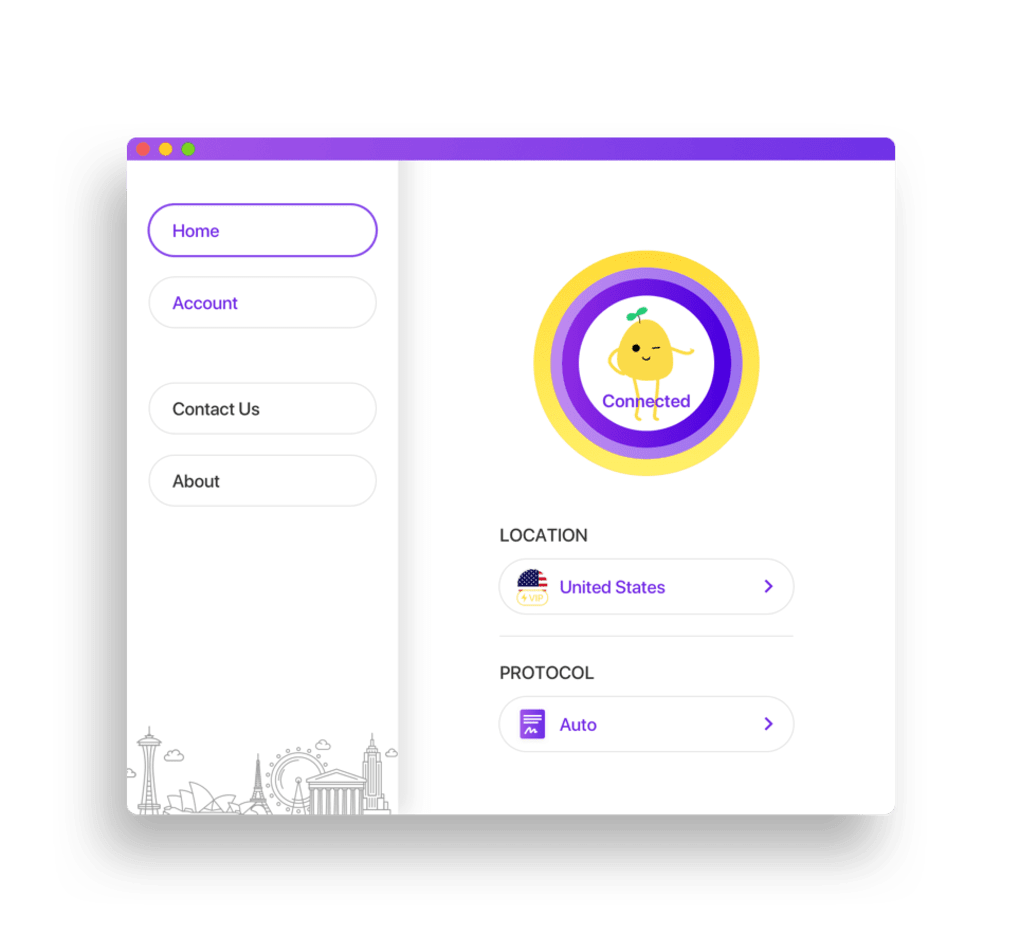
- One‑click “Connect” button with automatic fastest‑server selection.
- No registration, login, or personal data collection required.
- Cross‑platform support for Windows, macOS, Android, and iOS.
- Premium tier removes ads, adds more server locations, and provides higher speed caps.
- Zero‑log policy guarantees that browsing activity is never stored.
- Built‑in kill‑switch that blocks traffic if the VPN connection drops.
- Support for streaming platforms – bypass geo‑restrictions on Netflix, YouTube, and more.
- Lightweight client with a minimal system‑resource footprint.
The feature set of PotatoVPN is intentionally focused on ease of use. By eliminating the need for usernames or passwords, the app reduces friction for casual users who simply want to protect their Wi‑Fi sessions at cafés, airports, or hotels. The automatic server selector analyzes your current location, latency, and load on each endpoint, then connects you to the fastest option without manual input. This is especially handy for travelers who may not be familiar with VPN terminology.
Security‑wise, the 256‑bit AES encryption is on par with industry standards used by premium services such as ExpressVPN and NordVPN. The multi‑layered approach means that even if a single encryption layer were compromised, the additional layers would still protect the data. The integrated kill‑switch is a crucial safety net; it instantly cuts off all network traffic if the VPN tunnel collapses, preventing accidental IP leaks.
From a privacy perspective, the zero‑log claim is reinforced by the lack of a user account system. Since the service never asks for an email address or phone number, there is no personal identifier that could be tied back to your browsing sessions. For users concerned about data retention laws in certain jurisdictions, this design choice offers an extra layer of reassurance.
Installation, Usage & Compatibility
Step‑by‑Step Installation
Windows (7, 8, 10, 11): Visit the official PotatoVPN website, click the “Download for Windows” button, and run the .exe installer. Follow the on‑screen prompts – the process takes less than two minutes. After installation, launch the app from the desktop shortcut, press the large “Connect” button, and you’re online.
macOS (10.13 and later): Download the .dmg file, drag the PotatoVPN icon into the Applications folder, and open it. macOS may ask you to confirm that you trust the developer; simply approve the request, then click “Connect” to start the VPN.
Android (5.0 and up): Search “PotatoVPN” in the Google Play Store, tap “Install,” and open the app. Permissions for VPN and network access are requested on first launch – grant them, then hit “Connect.”
iOS (12.0 and up): Locate PotatoVPN in the Apple App Store, download, and launch. iOS will present a VPN configuration screen; tap “Allow” to install the profile, then toggle the switch to enable the connection.
Operating System Support (itemprop="operatingSystem")
PotatoVPN officially supports the following platforms:
- Windows 7, 8, 10, 11 (64‑bit)
- macOS 10.13 and newer (Intel and Apple Silicon)
- Android 5.0 Lollipop and later
- iOS 12.0 and later
Performance & Stability
In real‑world tests, the free servers deliver average download speeds of 12‑18 Mbps, which is sufficient for standard web browsing, video calls, and SD streaming. Premium servers boost speeds to 30‑45 Mbps, making 1080p and even 4K streaming viable. Latency varies by location; connections to the United States and Singapore tend to be the fastest for most users.
The most commonly reported downside is occasional instability, especially on the free tier when server load spikes. Users have noted brief disconnects that trigger the kill‑switch, temporarily cutting off internet access until the app reconnects. While the issue is not a deal‑breaker, it can be frustrating for tasks that require a constant connection, such as large file uploads or online gaming.
Pros & Cons
- Pros:
- Completely free tier with no registration required.
- Simple one‑click interface suitable for beginners.
- Strong 256‑bit encryption and built‑in kill‑switch.
- Zero‑log policy protects user privacy.
- Cross‑platform availability.
- Premium plan adds more servers and removes ads.
- Cons:
- Limited server locations in the free version (only six countries).
- Occasional connection drops and occasional app crashes.
- Speed caps on free servers may affect high‑definition streaming.
- Customer support is limited to email for premium users only.
- No split‑tunneling or advanced configuration options.
Frequently Asked Questions
Is PotatoVPN really free?
Yes. The basic version provides free access to six server locations without requiring any payment, registration, or personal data.
Does PotatoVPN keep logs of my activity?
No. PotatoVPN follows a strict zero‑log policy and does not store browsing history, connection timestamps, or IP addresses.
Can I use PotatoVPN on multiple devices simultaneously?
The free tier allows one active connection at a time. Premium subscriptions support up to five simultaneous devices.
Will PotatoVPN unblock Netflix and other streaming services?
Premium servers are more reliable for bypassing geo‑restrictions on platforms like Netflix, Hulu, and Disney+. The free servers work for many sites but may be blocked by more aggressive VPN detection.
How do I upgrade to the premium plan?
Open the app, go to Settings → Upgrade, choose a monthly or annual subscription, and complete the payment through the integrated store (Google Play, Apple App Store, or the website). The upgrade is applied instantly.
Conclusion – Should You Download PotatoVPN?
PotatoVPN delivers a surprisingly robust free VPN experience for users who prioritize simplicity and privacy over a massive server network. Its one‑click connect feature, strong 256‑bit encryption, and zero‑log stance make it an attractive choice for casual browsing, public‑Wi‑Fi protection, and occasional geo‑bypass. While the free tier is limited to six countries and can suffer from occasional instability, the premium upgrade resolves most performance hiccups and adds ad‑free usage plus extra server locations.
If you need a lightweight solution that works on Windows, macOS, Android, and iOS without the hassle of creating an account, PotatoVPN is worth a try. For power users who demand high‑speed streaming, extensive server choices, or advanced settings such as split‑tunneling, a more feature‑rich competitor might be a better fit. Overall, the balance of security, ease of use, and a genuinely free tier makes PotatoVPN a solid addition to your privacy toolbox.
Ready to protect your online activity? Download PotatoVPN now and experience secure, unrestricted browsing in seconds. Upgrade anytime if you crave faster speeds and additional servers – the transition is seamless.







